AI-prompt install
Install is no longer a docs page. Buyers paste a prompt into Cursor, Claude, or Windsurf and expect the agent to finish the job. If your install still assumes a human reading a README, you are designing for last year.
I call that an AI-prompt install: one contract that works as a pasteable prompt, a CLI, and a manual path. Same tokens. Same success rule. Same verify story.
I shipped this pattern in FirstDistro and UseLay. This is the design, not a twin product tour.
The install contract
One picture. Three actors. One outcome.
The buyer may never open a terminal. The developer may refuse the prompt and use the CLI. The agent only sees what you paste. All three still need the same definition of done.
What I refused
Honor-system Connected. A button that says you installed it teaches the wrong lesson. Status comes from real events. When the only signal is CLI smoke, say that honestly. Do not paint a fake Connected state.
Token replace rituals. No [YOUR_TOKEN] left for the buyer or the agent to fumble. The prompt ships with the real publishable token already filled.
Separate installs for AI and humans. One rail. Three doors. Same success definition in the empty state, settings, and modal. Agents do not get a second product.
Decision 1 · One contract, three doors
An AI-prompt install still has to serve people who will not paste a prompt.
In FirstDistro we treated that as one UI problem: different hands, same contract.
- A founder pastes into Cursor
- An engineer runs a CLI init
- Someone copies a snippet by hand
- A buyer emails a developer the same instructions
Those are not four products. They are four entrances. We put them on one mode rail (CLI · AI · Manual), with email-the-developer as a peer path in that family, not a separate onboarding flow above the rail.
AI is the default story. CLI and Manual stay peers so a senior engineer is never trapped in prompt theater. One shared panel owns the copy and the tokens. Empty state, settings, and modal only change the chrome.
Design · FirstDistro install rail (AI selected)
This is the FirstDistro empty-state rail with AI selected. Same panel powers settings and the install modal.
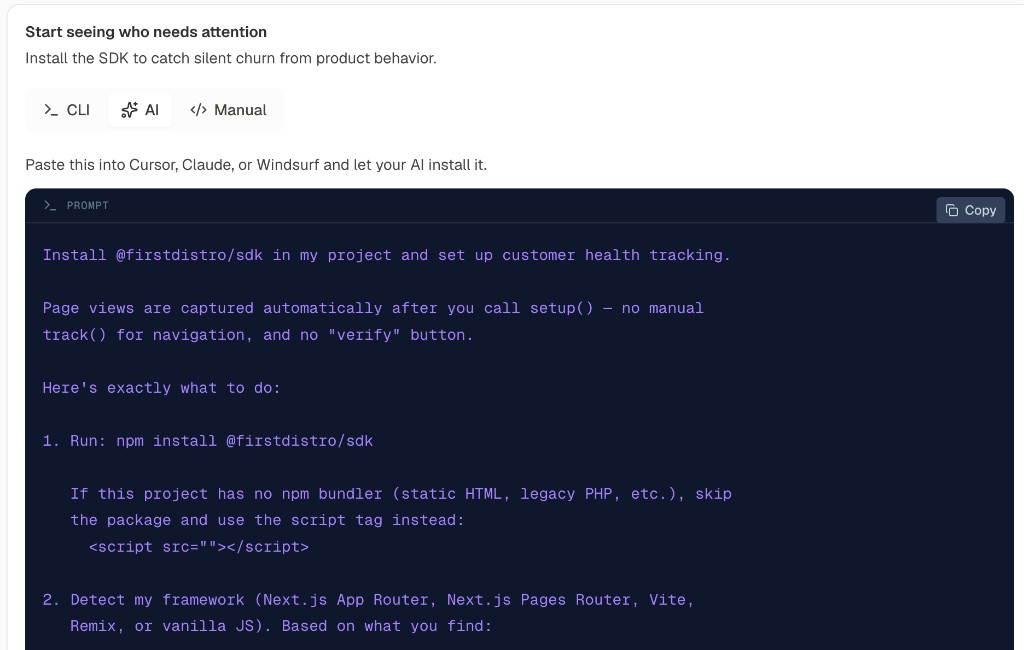
Here is a shortened sample of what that Copy prompt button hands you. The real dashboard prompt is longer. The shape is the point: token already filled, framework detect, identity, verify, and hard don’ts.
Install @firstdistro/sdk in my project and set up customer health tracking.

Page views are captured automatically after setup(), no manual track()
for navigation, and no "verify" button.

1. Run: npm install @firstdistro/sdk

2. Detect my framework (Next.js App Router / Pages, Vite, Remix, or
   vanilla JS). Wire FirstDistroProvider (React) or
   FirstDistro.initWithToken("fd_example123").

3. Where the logged-in user is available, set identity once with
   useFirstDistroSetup({ userId, userEmail }) or FirstDistro.setup({
   user: { id, email } }).

4. Optional server events: use @firstdistro/sdk/server with
   FIRSTDISTRO_API_KEY in .env.local only, never in client code.

VERIFY:
- Provider or initWithToken is in the codebase
- setup includes userEmail
- Log in locally, visit 2+ routes. Events should appear in the dashboard

Don't:
- Don't add track('page_viewed') to "prove" install
- Don't put private server keys in client code
Decision 2 · Design for the agent as a user
The prompt is product policy in pasteable form: detect the framework, wire identity, verify, and list the don’ts. If the agent invents unsafe patterns, the prompt failed.
UseLay does the same job with Install with AI as the zero-state default, shared prompt builders, and one panel in setup and settings. The npm package also ships AGENTS.md so agents inherit secret and server guardrails without a second doc site. Unsupported stacks get an honest manual path, never “coming soon.”
Security note
Yes, the AI sees whatever you paste into it. That is okay for the public install key that already has to live in your website code. It can only send product events for your account. It is not okay for private keys (server keys, support secrets). Those stay in a private env file on your server, never inside the prompt. AI-prompt install only works if you keep that line hard.
The rule
If an agent cannot complete install from your prompt without inventing unsafe patterns, your install is unfinished.